XRechnung
Standalone XML file
Machine-readable invoice data in XRechnung 3.0, using UBL syntax.
Enter the invoice details once. Save an XRechnung XML file or a ZUGFeRD PDF that your customer can read, with your logo on the page.
Local desktop app. Works offline.
From a draft with a preview to a saved invoice file.
Add items, quantities, prices and tax details. See the invoice take shape in the preview, then review it before export.
Save an unfinished draft and continue later.
Keep customer details ready for your next invoice. Choose a saved customer and reuse the information deliberately.
A local customer directory, within easy reach.
Choose a layout, add your logo and adjust color, typography and spacing. The invoice data stays the same.
Save your company style and reuse it.
Search and filter your recorded exports. Open the output or locate the saved file when you need it again.
Clear statuses for saved files and verification.
Choose the format your recipient needs.
Standalone XML file
Machine-readable invoice data in XRechnung 3.0, using UBL syntax.
PDF with embedded XML
A readable, branded PDF/A-3b with embedded EN 16931 invoice data.
XRechnung libraryEvery edition of the XRechnung specification, from 1.0 to the 4.0 preview, searchable and comparable. An independent reading aid for KoSIT's published specifications, not a validator.
Keep the layout of a compatible invoice PDF. Enter the invoice data and compare it with the original by hand.
Compatibility Embedding XML alone does not make an existing PDF PDF/A-3 or ZUGFeRD compliant. Signed, encrypted and unsupported PDFs are excluded.
Use the DocumentStudio template builder to give your ZUGFeRD PDFs your own look while keeping the invoice data intact.
Import your logo and choose a brand color, with the option to enter an exact hex value.
Choose a type style, page density and where your company details appear.
Review the result in the preview and save your style for future invoices.
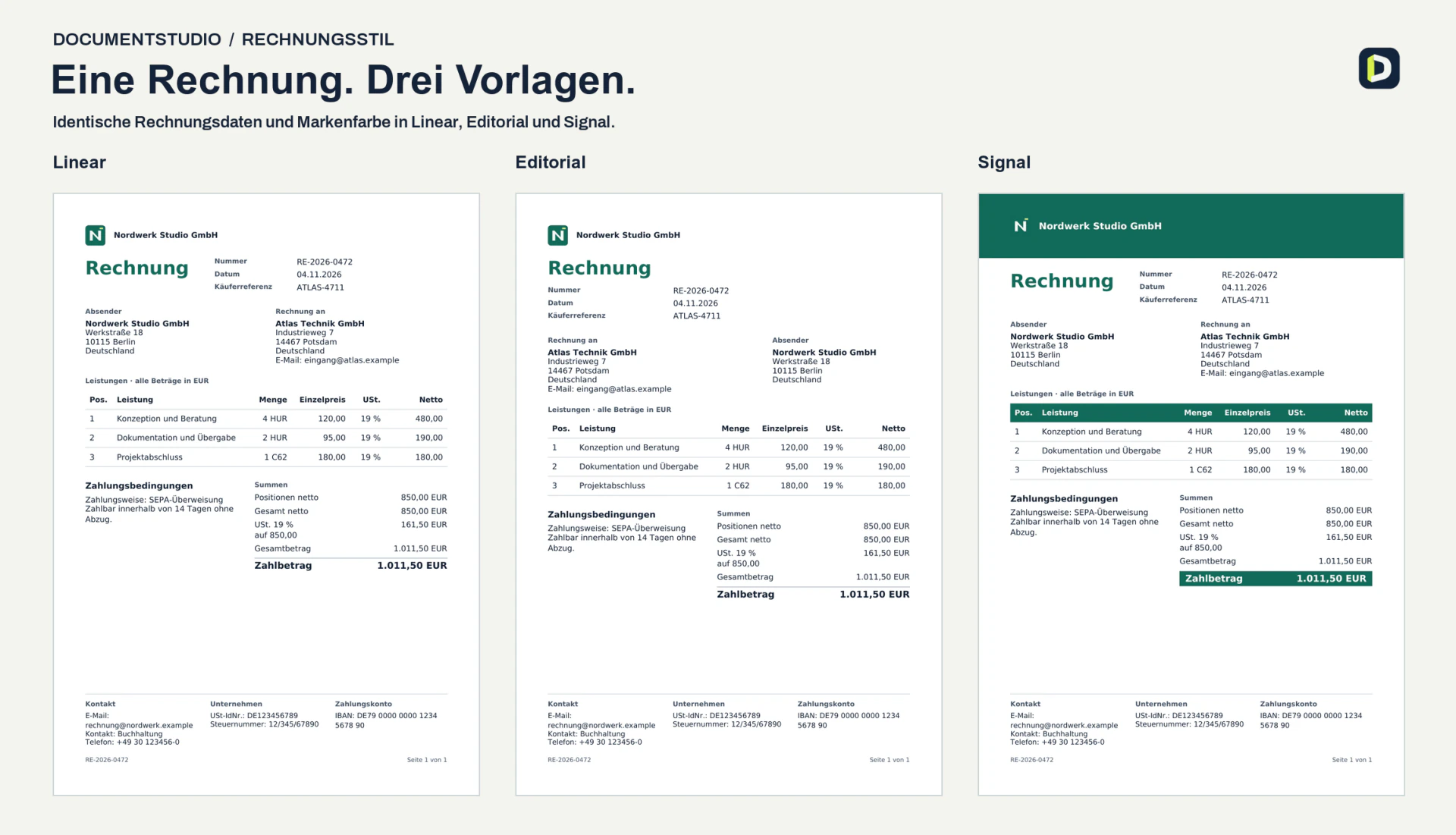
Clean lines and a compact layout.
More space between sections and a more open layout.
Color blocks highlight the header and total.
Three invoices generated in DocumentStudio from the same example data.
It is a desktop app for preparing outgoing invoices and exporting XRechnung XML or generated ZUGFeRD PDFs. It includes local customer details, company settings, saved drafts, invoice styling and export history. Bookkeeping, payment reconciliation and incoming-invoice automation are outside the current scope.
Yes. Invoice authoring, the app's checks and file export run locally and work offline. Installation, updates and support are agreed as part of the pilot setup.
This website is available in German, English, Russian and Polish. The application interface is currently in German. DocumentStudio creates German XRechnung and ZUGFeRD formats; it is not presented as a connection to other countries' national invoicing platforms.
Yes, if it is compatible. You enter the structured invoice details and manually compare them with the PDF before saving an enriched copy. The original stays unchanged. This is not automatic OCR or a general conversion of arbitrary PDFs into conforming ZUGFeRD files.
Windows 11 x64 and macOS builds are being evaluated. The exact installation and supported workflow are checked in a guided pilot before routine use. There is no public self-service download on this page.
One company profile, one reusable invoice style, representative test invoices and an agreed file destination. Your IT partner can help define installation, training and support. Price and license terms are agreed for the actual scope.
Prepare a short brief to discuss a pilot with your IT partner.
Copy or download the brief. Your entries stay in the browser.